

Robots.txt Generator Tool
What Is a Robots.txt File and Why Does Every Website Need One?
A robots.txt file is a small text file that lives on your website. It sits at the top level of your domain, like this: yourdomain.com/robots.txt
This file talks directly to search engine bots like Googlebot. It tells them which pages to crawl and which pages to skip. Think of it as a traffic guide for bots. Without it, bots wander all over your site without direction. Every website needs a robots.txt file because search engines follow rules. They check this file before they start crawling. If the file gives clear instructions, bots work smarter.
They focus on your important content. They skip the pages you do not want in search results. Without this file, you lose control. Bots may index your admin pages, test pages, or private folders. That creates problems for your SEO and your privacy.
How Does a Robots.txt Generator Save You Time?
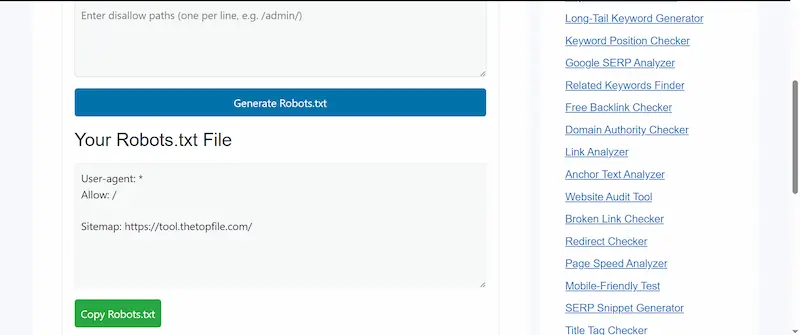
Writing a robots.txt file by hand looks easy. But one small typo can block your entire website from Google. That is not a small mistake it is a disaster. A robots.txt generator removes that risk. You enter your settings through a simple form. The tool writes the file for you in the correct format.
No syntax errors. No guessing. No stress. Our free robots.txt generator at tool.thetopfile.com builds your file instantly. You choose your rules, click generate, and copy the result. The whole process takes less than a minute.
What Are the Key Parts of a Robots.txt File?
Your robots.txt file uses a few simple commands. Let us break them down clearly.
User-agent tells the bot which search engine you are talking to. You can target all bots with an asterisk (*), or you can give special instructions to specific bots like Googlebot or Bingbot. Allow tells the bot that it can crawl a specific page or folder.
You use this when you want to make sure search engines can see your important content. Disallow tells the bot to stay away from a specific page or folder. You use this for admin areas, login pages, test directories, or any content you want to keep out of search results. Crawl-delay tells the bot how many seconds to wait between each page crawl.
This protects your server from getting overloaded, especially on small hosting plans. Sitemap tells the bot where to find your XML sitemap. Adding this line helps search engines discover all your pages faster and more efficiently. Our robots.txt generator creates all these parts for you automatically.
How Do You Use the Robots.txt Generator on This Page?
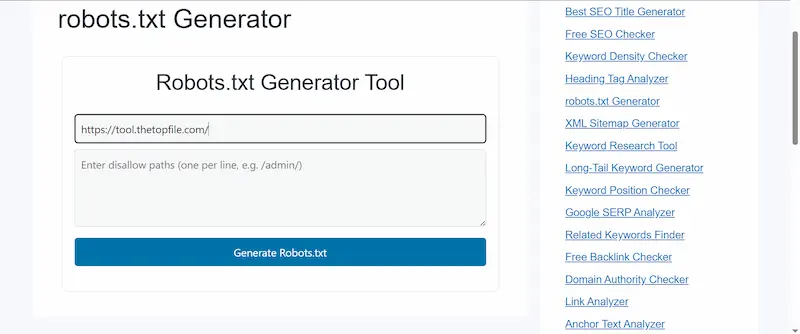
Using our tool is straightforward. Follow these simple steps.
First, decide which bots you want to allow or block. Most website owners allow all bots but restrict specific folders. Second, add any pages or directories you want to block. For example, you might block /wp-admin/ if you run a WordPress site. You might also block /staging/ or /private/ folders.
Third, enter your sitemap URL. This helps Google find all your pages quickly. Your sitemap usually lives at yourdomain.com/sitemap.xml. Fourth, click the Generate button. The tool creates your robots.txt file instantly.
Fifth, copy the result and upload it to the root folder of your website. You can do this through your hosting panel, cPanel, or an FTP client. If you use WordPress, plugins like Yoast SEO or Rank Math let you paste it directly inside the dashboard.
Try Other Free SEO Tools:
Does a Robots.txt File Actually Help Your SEO Rankings?
Yes, it does but not in the way most people think.
A robots.txt file does not directly boost your rankings. But it helps search engines work smarter on your website. And that leads to better SEO results over time.
Here is how it helps your SEO.
Search engines have a crawl budget. That means Google only spends a limited amount of time crawling your website. If bots waste that budget on useless pages, your real content gets crawled less often. Your robots.txt file directs bots to spend their time on the right pages. That improves how fast Google indexes your new content.
A good robots.txt file also helps you avoid duplicate content issues. Many websites create multiple URLs for the same page. Bots crawl all of them and get confused. You can use robots.txt to block the duplicate versions. That keeps your SEO authority clean and focused on one strong URL.
It also keeps your private pages private. You do not want Google indexing your login page, your cart pages, or your internal search results. Blocking these pages protects your site structure and makes your SEO stronger.
What Pages Should You Always Block in Your Robots.txt File?
Blocking the right pages is just as important as allowing the right ones. Here are the pages most websites should block. Admin and login areas should stay private. Search engines do not need to crawl /wp-admin/ or any admin dashboard.
Blocking these keeps your backend secure and saves crawl budget. Staging and test environments should never appear in Google search results. If you have a /staging/ or /test/ folder, always block it.
Duplicate content pages are common on e-commerce sites. Filter pages, sorting pages, and paginated archives often create duplicates. Blocking these keeps your SEO focused on your main product and category pages.
Internal search results pages are another common source of duplicate content. Block paths like /search/?q= to keep bots from indexing thousands of search results pages. Cart, checkout, and account pages offer no SEO value. Block them to save crawl budget for pages that actually drive traffic.
Where Do You Place the Robots.txt File After Generating It?
The placement of this file is critical. Your robots.txt file must live in the root directory of your website. There is no other place where it works. The correct location looks like this: https://yourdomain.com/robots.txt
If you place it anywhere else, bots will not find it. They will crawl your site as if no rules exist. To upload your file, log in to your hosting account and open the file manager. Navigate to the public_html folder. Create a new file named robots.txt. Paste the content from our generator. Save the file.
If you use WordPress, the easiest method is to use an SEO plugin. Yoast SEO, Rank Math, and All in One SEO all have a built-in robots.txt editor. You just paste the content and save. No FTP needed.
How Do You Test Your Robots.txt File After Uploading It?
Testing your file is a must. One wrong rule can block Google from your entire website.
Google Search Console has a free robots.txt tester. Log in to your account. Go to the robots.txt tester under the old tools section. Google shows you the current file and highlights any errors. You can also test specific URLs to see if they are blocked or allowed.
You can also check your file directly in your browser. Just type yourdomain.com/robots.txt in the address bar. You should see the plain text content of your file. If you see a 404 error, the file is missing or in the wrong location. Running this test after every update protects your website from accidental blocks.
What Is the Difference Between Robots.txt and a Noindex Tag?
Many people confuse robots.txt with the noindex meta tag. They are both SEO tools, but they work in different ways. A robots.txt file blocks bots from crawling a page. But it does not always stop the page from appearing in search results. If another website links to a blocked page, Google may still show that page in results even without crawling it.
A noindex meta tag tells Google not to include a page in search results. Bots can still crawl the page. They just will not show it to users. So which one should you use? If you want to hide a page from search results completely, use the noindex tag. If you want to protect a page from being crawled at all and save crawl budget, use robots.txt. For the best results, many websites use both together.
Can You Update Your Robots.txt File Anytime?
Yes, you can update it whenever you need to. Your robots.txt file is just a plain text file. You can edit it, replace it, or generate a new version at any time. Use our robots.txt generator again whenever your website changes. If you add new directories, launch a new section, or block new pages, update your file right away. After you update the file, test it in Google Search Console. This confirms that bots pick up the new rules quickly.
FAQs
What is a robots.txt generator?
A robots.txt generator is a free online tool that creates a robots.txt file for your website. It guides you through simple options and builds the correct file format automatically, without requiring any coding knowledge.
Is a robots.txt file required for SEO?
It is not required, but it is strongly recommended. Without a robots.txt file, search engines crawl your website without any direction. That wastes your crawl budget and may hurt your SEO performance over time.
How do I create a robots.txt file for free?
Use our free robots.txt generator at tool.thetopfile.com. Enter your settings, click generate, and copy the output. Upload the file to your website’s root folder and you are done.
Where do I upload the robots.txt file?
You must upload it to the root directory of your domain. The file must be accessible at yourdomain.com/robots.txt. You can upload it using cPanel, FTP, or directly through your CMS SEO plugin.
Can robots.txt block Google from indexing my pages?
It can block Google from crawling your pages. But blocking crawling does not always remove a page from search results. For complete removal, use a noindex tag in addition to your robots.txt rules.
What happens if I have no robots.txt file?
Search engines crawl your entire website without any rules. This can waste crawl budget on unimportant pages and may expose private or sensitive sections of your site to indexing.
Can I block specific bots with robots.txt?
Yes. You can target specific bots using the User-agent directive. For example, you can block AI scrapers or specific crawlers while still allowing Googlebot to crawl your content normally.
How often should I update my robots.txt file?
Update it whenever your site structure changes. If you add new folders, launch new sections, or change your URL structure, update your robots.txt file and test it right away in Google Search Console.
Does robots.txt protect my website from hackers?
No. Robots.txt is a guide for bots, not a security tool. Malicious bots can ignore it entirely. Always use proper security measures like passwords, firewalls, and access controls to protect sensitive content.
What is a crawl budget and how does robots.txt help manage it?
A crawl budget is the number of pages Google crawls on your website within a given time. By blocking unimportant pages, robots.txt helps Google focus on your most valuable content. This improves how quickly new pages get indexed.