Related Keywords Finder
What Is a Related Keywords Finder and Why Do You Need It?
A Related Keywords Finder is a free tool that shows you all the words and phrases connected to your main keyword. You type in one word, and it gives you dozens of smart keyword ideas. These are the real words people type into Google every day.
Think of it like this. When you search for “apple,” Google knows you might also want to know about “apple fruit,” “apple juice,” or “apple phone.” These connected ideas are called related keywords or semantic keywords. They help Google understand your page better.
When you use a Related Keywords Finder, you stop guessing. You start writing content that Google actually wants to show people.
How Does a Related Keywords Finder Work?
This tool works in a very simple way. You enter your main topic or seed keyword. The Related Keywords Finder then searches Google’s data and finds all the words that connect to your keyword. It shows you related search terms, long-tail keywords, and question-based phrases that real users type.
The tool looks at patterns in Google search. It finds words that appear together often. It also finds questions people ask about your topic. This gives you a full map of everything you need to write great content.
You get all of this in seconds. No guessing. No wasting hours of research time.
Why Do Related Keywords Help You Rank Higher on Google?
Google uses something called semantic search. This means Google does not just look for your exact keyword. It looks at the full meaning of your page. When your content covers a topic deeply, using many related terms, Google trusts it more. Pages that use only one keyword look thin to Google. Pages that use many related keywords look rich and helpful.
Google rewards helpful pages with higher rankings. Using a Related Keywords Finder helps you build that rich content. You cover the topic fully. You answer all the questions users have. This makes Google happy and it makes your visitors happy too.
Try Other Free SEO Tools:
How Do You Use the Related Keywords Finder on This Page?
Using this tool is very easy. Follow these simple steps.
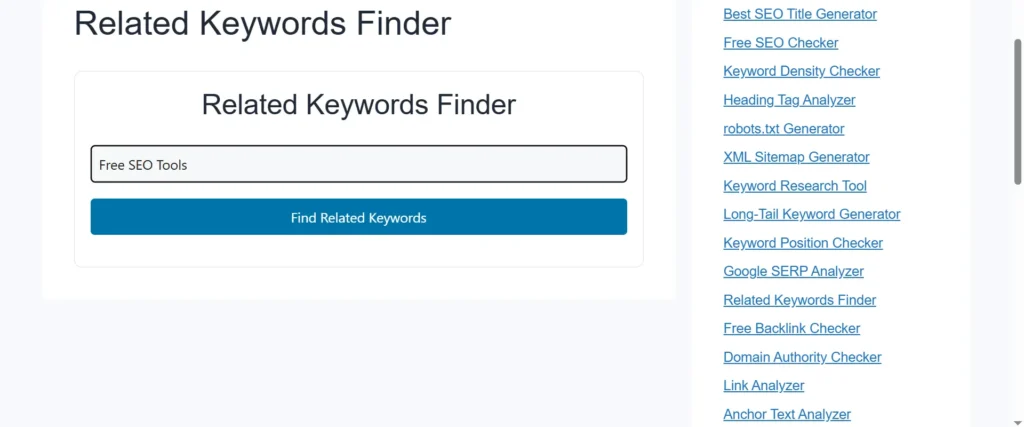
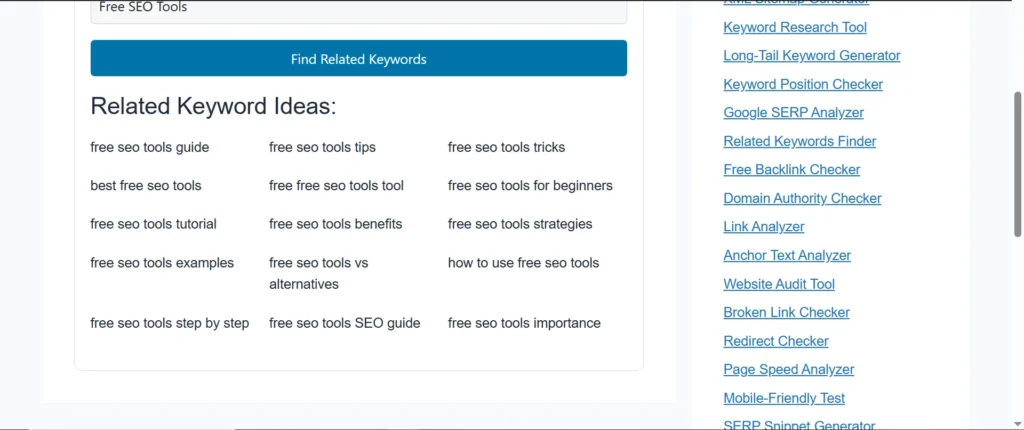
First, type your main keyword into the search box at the top of this page. Second, press the Find Related Keywords button. Third, the tool shows you a list of all the related keywords for your topic. Fourth, pick the best keywords for your content and start writing.
That is it. No sign-up required. No credit card needed. The Related Keywords Finder on tool.thetopfile.com is completely free to use.
What Kind of Keywords Does This Tool Find for You?
This tool finds many types of useful keywords. It discovers long-tail keywords, which are longer phrases with less competition. It finds question-based keywords that start with “what,” “how,” “why,” and “where.” It also finds LSI keywords, which stand for Latent Semantic Indexing. These are words that naturally belong in content about your topic.
For example, if your main keyword is “lose weight,” the tool might show you related terms like “how to lose weight fast,” “best foods to lose weight,” “lose weight without exercise,” and “weight loss tips for beginners.” All of these are ideas your content can cover.
Using all these types of keywords makes your content stronger and more complete.
Who Should Use a Related Keywords Finder?
This tool helps many different people. Bloggers use it to write better articles. Small business owners use it to bring more customers to their websites. YouTube creators use it to get more views on their videos. Freelance writers use it to find content ideas fast.
If you run a website and you want more traffic from Google, this tool is for you. You do not need to be an SEO expert. You do not need technical skills. If you can type a word into a box, you can use this tool.
Even beginners get professional results with the Related Keywords Finder.
What Makes This Related Keywords Finder Different From Other Tools?
Many keyword tools exist online. But most of them charge monthly fees. Some tools hide the best data behind a paywall. Others show too much complicated information that confuses beginners.
The Related Keywords Finder on this site keeps things simple and free. It gives you clean, clear results. You see your related keywords right away. You do not need to read charts or pay for a subscription.
How Do Related Keywords Improve Your SEO Content Strategy?
A strong SEO content strategy starts with keyword research. When you find related keywords before you write, you plan your content better. You know exactly what to cover. You know what questions to answer. You know which words to include naturally in your writing.
This approach helps you create what SEO experts call “topic authority.” When your page covers a topic fully using many related terms, Google sees you as an authority on that subject. Authority pages rank higher and stay at the top longer.
The Related Keywords Finder gives you the foundation for this strategy. It hands you the complete keyword map before you write a single word.
Can a Related Keywords Finder Help You Beat Your Competitors?
Yes, it absolutely can. Your competitors are already ranking for many related keywords, maybe without even realizing it. When you use a Related Keywords Finder, you see those keyword gaps clearly. You find the keywords they miss.
You write content that covers those topics. You fill the gaps they leave behind. This is how newer websites beat bigger, older sites on Google. Smart keyword research with a Related Keywords Finder turns a small site into a competitive one.
What Are Long-Tail Keywords and Why Do They Matter?
Long-tail keywords are longer, more specific search phrases. They usually have three or more words. For example, “best free related keywords finder tool” is a long-tail keyword. These phrases have lower competition on Google. That means it is easier for your page to rank for them.
Long-tail keywords also bring visitors who know exactly what they want. These visitors are more likely to read your full article, click your links, and come back to your site again. The Related Keywords Finder helps you discover hundreds of these valuable long-tail phrases for any topic.
How Often Should You Use a Related Keywords Finder?
You should use it every time you plan a new piece of content. Before you write a blog post, run your topic through the tool. Before you create a product page, check what related keywords people search for. Before you record a video, find the connected search terms your audience uses.
Using this tool as part of your regular content workflow keeps your SEO strategy fresh and data-driven. It removes guesswork and keeps your content aligned with what real users actually want to find.
FAQs
What is a related keywords finder?
A related keywords finder is a free online tool that shows you all the search terms connected to your main keyword. It helps you discover semantic keywords, long-tail phrases, and question-based terms that people actively search for on Google.
What are related keywords in SEO?
Related keywords in SEO are words and phrases that are topically connected to your main keyword. Google uses these related terms to understand the full context of your content, which helps your page rank for more search queries.
How do I find related keywords for free?
You can use the free Related Keywords Finder on tool.thetopfile.com. Just enter your main keyword and the tool instantly shows you all the related search terms without any cost or sign-up.
Why are related keywords important for SEO?
Related keywords help Google understand what your page is really about. Using them signals that your content is thorough and helpful. Pages with strong semantic keyword coverage tend to rank higher and attract more organic traffic.
What is the difference between related keywords and LSI keywords?
LSI (Latent Semantic Indexing) keywords are a type of related keyword. They are words that naturally appear together with your main topic. All LSI keywords are related keywords, but not all related keywords are strictly LSI. Both types help improve your content’s relevance in Google’s eyes.
How many related keywords should I use in an article?
There is no fixed number. Focus on covering your topic naturally and thoroughly. Use the most relevant related keywords in your headings, introduction, and body text. Avoid stuffing. Aim for content that reads naturally while covering the full topic.
Can a related keywords finder help me rank on the first page of Google?
Yes. Using related keywords increases your chances of ranking for multiple search terms, including the main keyword and many secondary terms. Covering a topic fully with semantic keywords signals topical authority, which Google rewards with higher rankings.
Does this related keywords finder tool work for any language or niche?
Yes. You can enter keywords from any niche, including health, technology, finance, travel, food, and more. The tool finds related terms based on real Google search data, making it useful for any topic or industry.
What is semantic SEO and how does a related keywords finder help?
Semantic SEO is the practice of writing content that covers a topic deeply using many related terms and concepts. A Related Keywords Finder gives you all the semantic terms you need so your content satisfies Google’s understanding of your topic.
Is this related keywords finder tool free to use?
Yes. The Related Keywords Finder on tool.thetopfile.com is completely free. You do not need to create an account or enter any payment information to use it.