
Heading Tag Analyzer Tool
Heading Tag Analyzer: The Smart Tool That Fixes Your SEO Structure Fast
Are you working hard on your website but still not ranking on Google? The problem might be hiding in your headings. A heading tag analyzer shows you exactly what is wrong with your page structure. It reads your HTML code and finds every H1, H2, H3, H4, H5, and H6 tag on your page. Then it tells you what to fix. This one simple tool can change how Google sees your content.
What Is a Heading Tag Analyzer?
A heading tag analyzer is a free online SEO tool. It scans any webpage and pulls out all the heading tags from H1 to H6. It shows them in order, checks their structure, and flags any problems. Think of it like this. Your page content is a book. The H1 is the book title. The H2 tags are chapter names. The H3 tags are topics inside each chapter.
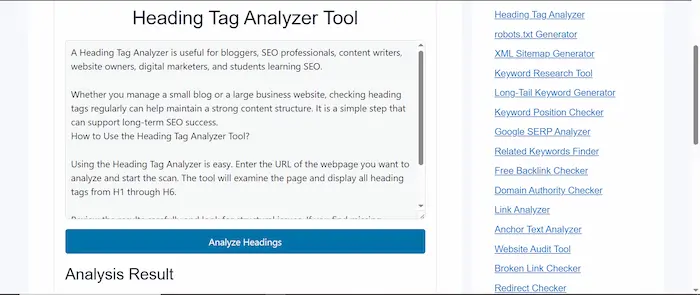
The heading tag analyzer reads your book and tells you if the chapters are in the right order. The tool at tool.thetopfile.com works the same way. You paste your HTML content into the box. The tool reads it instantly. Then it shows you a full picture of your heading structure.
Try Other Free SEO Tools:
Why Do Heading Tags Matter for Google Rankings?
Google reads your headings before anything else on the page. Headings help Google understand what your page is about. They also help Google decide which searches your page should appear for. When your headings follow a clear order, Google can index your content better. This means your page has a stronger chance of showing up in search results.
A good heading structure also helps Google pick your content for featured snippets and AI overview boxes. Screen reader tools also use headings to help people with disabilities navigate your page. So proper headings help real users too, not just search engines.
What Does a Heading Tag Analyzer Actually Check?
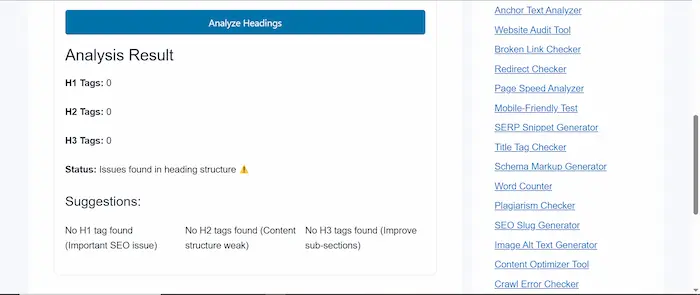
The heading tag analyzer tool checks several important things at once. It checks whether your page has an H1 tag. Every page needs exactly one H1 tag. The H1 tells Google the main topic of the page. If your H1 is missing, Google gets confused about what your page is about.
It checks for multiple H1 tags. You should use only one H1 per page. Having two or more H1 tags sends mixed signals to search engines. This weakens your page’s ability to rank well. It checks the heading order. Your headings must go in order: H1, then H2, then H3.
Skipping from H2 directly to H4 breaks the logical structure. This confuses both users and Google crawlers. It checks for empty headings. Empty heading tags hurt your SEO score. They waste space and give Google nothing useful to read. It checks heading length. Headings that are too long become hard to scan. Most experts recommend keeping headings under 60 to 70 characters.
How Do You Use the Heading Tag Analyzer Tool?
First, open the page where the heading tag analyzer lives. Next, copy the HTML source code from your webpage. Then paste it into the input box on the tool. Finally, click the analyze button. The tool reads your headings in seconds and shows you the full structure. You can see each heading level displayed clearly. The tool highlights any errors or warnings. You know right away what needs fixing. No login is needed and no payment is required.
What Is the Correct Heading Structure for SEO?
A correct heading structure follows a simple and logical path.
Start with one H1 tag at the top. This is your main page title. Your primary keyword should appear naturally inside it. The H1 sets the topic for the entire page. Use H2 tags for your main sections. Think of each H2 as a chapter title. Your H2 headings can include secondary keywords and related phrases. Use as many H2 tags as your content needs. Use H3 tags to break down content inside each H2 section.
These are your sub-points. H3 tags give more detail and help organize complex topics into smaller pieces. Use H4 through H6 tags only when your content is very detailed and needs extra layers. Most regular websites do not need headings beyond H3. Never skip heading levels. Going from H2 to H4 breaks the structure. Search engines and screen readers both struggle with broken heading hierarchies.
How Does a Heading Tag Analyzer Help with AI Overview Rankings?
Google’s AI overview feature reads pages differently than regular search results. AI tools scan your page at the passage level. Your headings act as labels for each passage. When your H2 and H3 tags are clear and descriptive, AI systems can find and cite specific sections of your content.
This gives your page a much higher chance of appearing inside AI overviews and featured snippet boxes. The heading tag analyzer helps you write headings that work for both human readers and AI systems. When your structure is clean and logical, AI can extract your answers more easily.
What Common Heading Mistakes Hurt Your SEO?
Many websites make the same heading mistakes without knowing it.
Some sites use heading tags only for design. They make text look bigger with H tags instead of using CSS styling. This confuses search engines because the headings do not match the actual content flow. Some sites skip heading levels. They jump from H1 straight to H3. This breaks the document outline.
Search engines lose track of how your content connects. Some sites use keyword-stuffed headings. They force the same keyword into every heading. This looks spammy and actually hurts rankings instead of helping them. Some sites use vague headings like “Introduction” or “More Information.” These headings give Google nothing useful.
Every heading should describe exactly what the next section covers. Some sites have no H1 tag at all. This often happens when a website theme uses the site logo as the main heading by mistake. The heading tag analyzer catches all of these problems instantly.
How Do You Write Better Headings After Using the Analyzer?
After the tool shows you your heading problems, you can fix them step by step.
Write each heading so that it describes the content below it clearly. Ask yourself: if someone only reads my headings, do they understand my whole page? If the answer is yes, your headings are working well. Include your main keyword naturally in your H1. Do not force it into every heading. Place related keywords in H2 and H3 tags where they fit naturally.
Keep your headings short and direct. A heading with 8 to 10 words is usually enough. Long headings become hard to read and hard to scan. Format some H2 headings as questions. Questions match how real people search on Google. This increases your chance of appearing in featured snippets and AI answers.
Why Should You Use the Heading Tag Analyzer on tool.thetopfile.com?
The heading tag analyzer on tool.thetopfile.com gives you fast and clear results. You do not need to create an account. You do not need to pay anything. The tool works instantly after you paste your HTML content. It sits alongside other powerful tools on the platform. You can check your keyword density, title tags, meta descriptions, and page speed all in one place.
This makes it easier to run a complete SEO audit without switching between different websites. Using this tool regularly helps you catch heading errors before they hurt your rankings. You can analyze new pages before publishing them. You can also recheck old pages and fix problems that have been hurting your traffic for months.
How Often Should You Analyze Your Heading Tags?
You should analyze your heading tags every time you publish new content. This catches errors before Google indexes the page. You should also run an analysis when you update old content. Sometimes editing a page shifts the heading structure without you noticing.
The analyzer finds these new problems quickly. Running a monthly audit of your top pages is a smart habit. Pages that already rank well can fall in rankings if their heading structure breaks during updates. Regular checks keep your content structure healthy.
What Other Tools Work Well with a Heading Tag Analyzer?
A heading tag analyzer works best when you pair it with other SEO tools.
Use a title tag checker to make sure your page title aligns with your H1. They do not need to be identical, but they should cover the same main topic. Use a keyword density checker to see how often your main keyword appears across your content. Your headings contribute to keyword presence, so balanced use matters.
Use a meta description generator to write a strong search snippet. A clear meta description paired with a strong H1 gives your page a complete first impression in Google search results. Use a content optimizer tool to see how well your full article covers the topic. Great headings paired with complete content give you the strongest possible SEO foundation.
Final Thoughts
Heading tag analyzer tools take the guesswork out of page structure. You paste your content, the tool finds the problems, and you fix them. The result is a page that Google can read more easily, rank more accurately, and feature more often in search results and AI overviews. Strong headings do not just help search engines. They help real readers scan your page, find what they need, and stay longer on your site.
A lower bounce rate and longer session time both send positive signals to Google. Start using the heading tag analyzer on tool.thetopfile.com today. Check your most important pages first. Fix the errors the tool finds. Then watch how your content climbs in search rankings step by step.
FAQs
What is a Heading Tag Analyzer?
A Heading Tag Analyzer is an SEO tool that examines the heading structure of a webpage and displays all H1, H2, H3, H4, H5, and H6 tags.
Why should I use a Heading Tag Analyzer?
You should use a Heading Tag Analyzer to identify heading structure problems that may affect readability, user experience, and search engine optimization.
Does a Heading Tag Analyzer help improve SEO?
Yes. A Heading Tag Analyzer helps you create a better content hierarchy, which makes it easier for search engines to understand your page.
Can I check H1 and H2 tags with this tool?
Yes. The tool analyzes all heading levels, including H1, H2, H3, H4, H5, and H6 tags.
What is the ideal heading structure for a webpage?
A webpage should usually contain one H1 tag for the main topic, followed by H2 tags for major sections and H3 to H6 tags for supporting content.
Can multiple H1 tags hurt SEO?
Multiple H1 tags may create confusion about the main topic of a page. A Heading Tag Analyzer can help identify this issue.
Is the Heading Tag Analyzer free to use?
Yes. Our Heading Tag Analyzer is completely free and available online for quick SEO analysis.
How often should I analyze heading tags?
You should analyze heading tags whenever you publish new content or update existing pages to maintain a strong SEO structure.
Can beginners use a Heading Tag Analyzer?
Yes. The tool is designed for both beginners and SEO experts and provides easy-to-understand results.