
XML Sitemap Generator Tool
What Is an XML Sitemap Generator and Why Does Every Website Need One?
An XML Sitemap Generator is an online tool that creates a special file called sitemap.xml. This file lists all the important pages on your website in one clean place. Search engines like Google and Bing read this file to understand your website’s structure. They use it to crawl and index your content faster and more efficiently.
Every website needs this file. New websites need it because Google does not know them yet. Large websites need it because Google can miss pages buried deep in the site. E-commerce stores need it because they have hundreds of product pages. Even small blogs benefit because it speeds up indexing of new posts.
Without a sitemap, Google relies only on links to find your pages. That process is slow and unreliable. With an XML sitemap, you take control. You tell Google exactly which pages matter most and when they were last updated.
How Does This Free XML Sitemap Generator Tool Work?
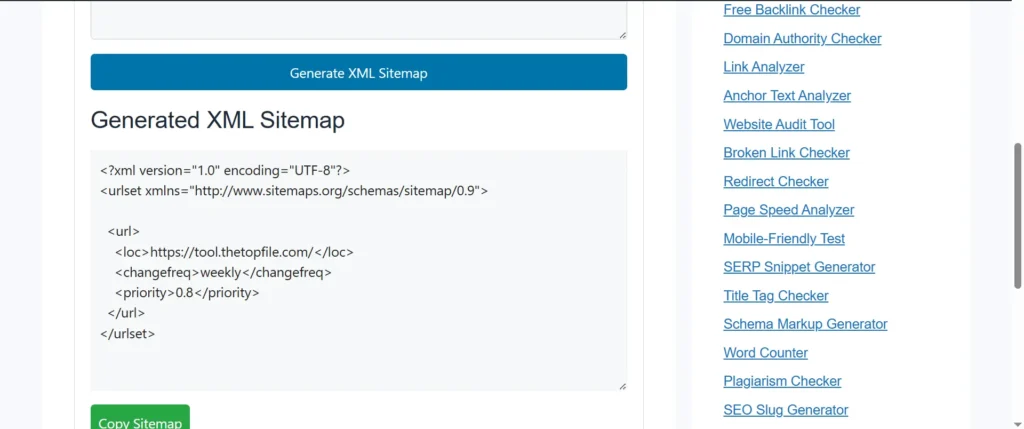
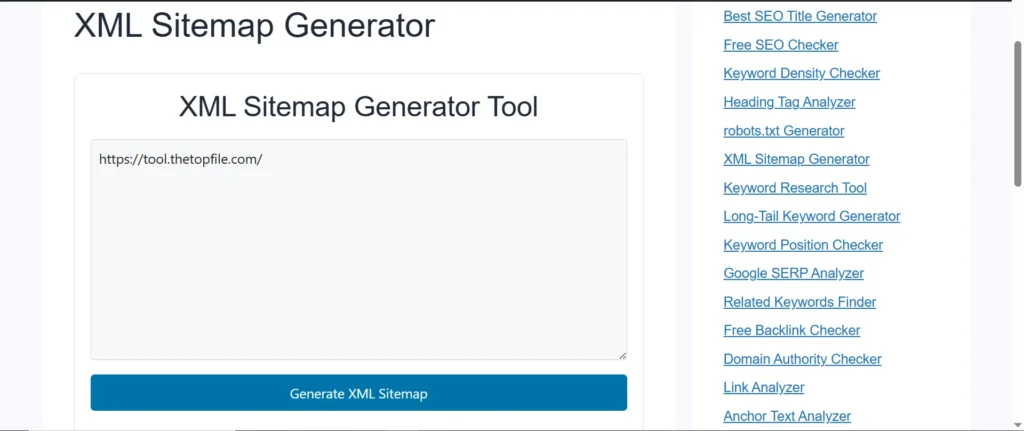
This tool works in three simple steps. First, you enter your website URL into the input box above. Second, the tool crawls your website and finds all important pages automatically. Third, it generates a ready-to-use sitemap.xml file that you can download in seconds.
The generated sitemap follows the official Sitemap Protocol 0.9 standard. This means Google, Bing, Yahoo, and all major search engines accept it without any errors. The file includes key details like the URL of each page, the last modification date, and the priority level. Search engines use this data to crawl your site more smartly.
You do not need to write a single line of code. You do not need to sign up for an account. You just paste your URL, click generate, and download your sitemap. It is that simple.
What Are the Real SEO Benefits of Using an XML Sitemap Generator?
Using an XML Sitemap Generator gives your website real SEO advantages. Google says that sitemaps help especially when your site is new, large, or has pages that are hard to find through regular links. First, it speeds up indexing. When you launch a new page, you want Google to index it fast. A sitemap signals Google about that new page immediately. This cuts the waiting time from weeks to just days.
Second, it improves crawl efficiency. Google has a crawl budget. It does not crawl every website forever. A sitemap helps Google spend its crawl budget on your important pages first. This means your best content gets seen and ranked faster.
Third, it helps Google find orphan pages. These are pages with no internal links pointing to them. Without a sitemap, Google may never discover these pages. The sitemap brings them all to Google’s attention.
Fourth, it supports higher rankings. When Google indexes your pages properly, those pages stand a better chance of ranking on the first page of search results. More indexed pages mean more traffic from search engines.
Try Other Free SEO Tools:
Who Should Use This XML Sitemap Generator Tool?
Anyone who owns a website should use this XML Sitemap Generator. You do not need to be a developer or SEO expert. The tool does all the hard work for you. Bloggers use it to make sure every new post gets discovered by Google quickly. Small business owners use it so their service pages appear in local search results.
E-commerce site owners use it to get all their product pages indexed. Web developers use it to speed up the launch of new websites for their clients. Even if your website runs on WordPress, Shopify, or any other platform, this tool works perfectly. It generates a universal sitemap.xml file that works with any website and any search engine.
How Do You Submit Your XML Sitemap to Google After Generating It?
After you generate your sitemap using this tool, you need to submit it to Google. This step tells Google where your sitemap lives so it can start using it right away.
You submit your sitemap through Google Search Console. First, you sign into your Google Search Console account. Then you go to the Sitemaps section in the left menu. You paste the URL of your sitemap file, which usually looks like yourwebsite.com/sitemap.xml. Then you click Submit. Google confirms it and starts reading your sitemap.
You should also add your sitemap URL to your robots.txt file. This helps other search engines like Bing and Yandex find it too. The line you add looks like this: Sitemap: https://yourwebsite.com/sitemap.xml. This single line tells every search engine bot exactly where your sitemap is.
What Pages Should You Include in Your XML Sitemap?
Your XML sitemap should include only the pages you want Google to rank. Not every page on your site belongs in a sitemap. Including the wrong pages wastes Google’s crawl budget and dilutes your SEO efforts.
You should include your homepage, service pages, product pages, blog posts, category pages, and any landing pages you want to rank. These are pages that bring value to visitors and that you want to appear in search results.
You should not include pages like login pages, thank-you pages, admin pages, duplicate pages, pages blocked by robots.txt, or pages marked with a noindex tag. These pages do not help your SEO. Adding them to your sitemap sends confusing signals to Google and can slow down your crawling efficiency.
Our XML Sitemap Generator automatically crawls your site and focuses on indexable, valuable URLs. It saves you from making these common mistakes manually.
How Often Should You Update Your XML Sitemap?
You should update your XML sitemap every time you add new pages or make major changes to existing ones. An outdated sitemap is worse than a helpful one. It gives Google wrong signals and can slow down your rankings.
If you publish new blog posts regularly, update your sitemap after each new post. If you add new products to your store, regenerate your sitemap right away. If you redesign your website and change URLs, create a fresh sitemap immediately so Google knows about the new structure.
Use this XML Sitemap Generator anytime you need a fresh, accurate sitemap. It takes only seconds to generate a new one. You can then re-submit the updated sitemap to Google Search Console to trigger a fresh crawl.
What Is the Difference Between an XML Sitemap and an HTML Sitemap?
An XML sitemap and an HTML sitemap serve two different purposes. Understanding the difference helps you use both correctly to boost your SEO.
An XML sitemap is a file for search engines only. Human visitors never see it. It lives in your website’s root directory and speaks directly to Google, Bing, and other crawlers. It tells them which pages exist, when they were last updated, and how important they are relative to each other.
An HTML sitemap is a regular web page for human visitors. It lists links to all main sections and pages of your website. It helps users navigate your site when they cannot find what they are looking for. It also provides internal links that support SEO.
Both types are useful. Your XML sitemap helps search engines crawl your site. Your HTML sitemap helps users navigate your site. Use this free XML Sitemap Generator tool to create your XML sitemap, and then consider building an HTML sitemap for your visitors as well.
Can a Sitemap Generator Improve Your Google Search Rankings Directly?
A sitemap generator does not directly give you a ranking boost on its own. Google’s John Mueller confirmed this clearly. A sitemap helps Google discover and index your pages. Once your pages are indexed, their quality, content, and backlinks determine where they rank.
Think of a sitemap as the door. It lets Google walk into your house. But what ranks well is the quality of what is inside the house. You still need good content, fast page speed, mobile-friendly design, and strong internal links to rank high.
That said, without a sitemap, some of your pages may never get indexed at all. Pages that never get indexed can never rank. So while the sitemap does not rank pages directly, it creates the opportunity for them to rank. This is why Google’s own John Mueller called having an XML sitemap a “minimal baseline for any serious website.”
Why Is This Free XML Sitemap Generator Better Than Doing It Manually?
Creating an XML sitemap manually takes a very long time. You have to write XML code for every single URL on your site. One small error in formatting can make the whole file invalid. Google then ignores it completely.
Our XML Sitemap Generator handles everything automatically. It crawls your site, finds all indexable URLs, formats the XML file correctly, and adds the right metadata. You get a clean, error-free sitemap.xml file in seconds. No coding. No formatting errors. No wasted time.
This tool follows all official sitemap guidelines set by Google and the sitemaps.org protocol. The file it creates is ready to submit to Google Search Console and Bing Webmaster Tools immediately. You save hours of work and avoid costly mistakes with just one click.
FAQs
What is an XML sitemap generator?
An XML sitemap generator is a free online tool that automatically creates a sitemap.xml file for your website. This file lists all important URLs on your site and helps search engines like Google and Bing discover, crawl, and index your pages faster and more efficiently.
Is a sitemap good for SEO?
Yes, a sitemap is very good for SEO. It helps search engines find all your important pages, speeds up indexing of new content, improves crawl efficiency, and helps orphan pages get discovered. Google recommends using a sitemap for any website that is new, large, or has complex page structures.
How do I create an XML sitemap for free?
You can create an XML sitemap for free using our XML Sitemap Generator tool. Simply enter your website URL in the input field, click Generate, and download your ready-to-use sitemap.xml file. No sign-up or payment is required.
How do I submit my sitemap to Google?
You submit your sitemap to Google through Google Search Console. Go to the Sitemaps section, paste your sitemap URL (usually yoursite.com/sitemap.xml), and click Submit. Google will start reading your sitemap and crawling your pages right away.
What is the difference between XML sitemap and robots.txt?
A robots.txt file tells search engines which pages NOT to crawl. An XML sitemap tells search engines which pages TO crawl and index. They work together. Robots.txt excludes pages. The sitemap includes important pages. Both help you control how search engines interact with your website.
How many URLs can an XML sitemap have?
Google allows a maximum of 50,000 URLs per sitemap file, with a file size limit of 50 MB. If your website has more than 50,000 pages, you need to split them into multiple sitemaps and submit a sitemap index file to Google Search Console.
Does my WordPress site need an XML sitemap?
Yes, every WordPress site benefits from an XML sitemap. You can use plugins like Yoast SEO or RankMath to auto-generate one. Alternatively, you can use this free XML Sitemap Generator tool to create and download a sitemap.xml file manually and upload it to your site’s root folder.
What should I NOT include in my XML sitemap?
You should not include login pages, thank-you pages, duplicate pages, admin pages, pages with noindex tags, pages blocked by robots.txt, or paginated pages. Only include pages that have real value for visitors and that you want Google to rank in search results.
How often should I update my XML sitemap?
You should update your XML sitemap every time you add new pages, delete old pages, or make major changes to your site structure. For blogs and e-commerce sites that change frequently, regenerating and re-submitting your sitemap regularly is a strong SEO best practice.
Does having an XML sitemap guarantee higher Google rankings?
No, a sitemap does not guarantee higher rankings by itself. It helps Google discover and index your pages. But rankings depend on your content quality, page speed, mobile usability, backlinks, and overall SEO. A sitemap creates the opportunity for your pages to rank quality content helps them rank high.